You are not logged in.
Pages: 1
- Index
- » Trading Platforms
- » cTrader Web 3.4 now features 2 new tools: Pencil Tool & Line Study
#1 27-11-2019 09:30:33
- johnedward
- Admin & Trader

- From: Paris - France
- Registered: 21-12-2009
- Posts: 3926
- Website
cTrader Web 3.4 now features 2 new tools: Pencil Tool & Line Study
cTrader Web 3.4 now features 2 new tools: Pencil Tool & Line Study

Spotware Systems has just unveiled a series of improvements available in the latest version of cTrader Web.
Pencil Tool
The Pencil Tool allows traders to draw shapes and objects of their choice on charts in any graphic mode using a "pen slider".
The Pencil Tool isn't tied to a specific shape like most other drawing tools.

Update of online analysis tools
The introduction of new online analytical tools offers greater convenience for traders and a customised toolkit appearance. Among the proposed options, new features include a colour picker with opacity settings and a line thickness selector.
New options are accessible via the line study toolbar or object parameters, which unfold with a mouse click on the relevant object.

Trading Central
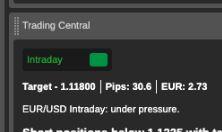
The active symbols panel in the Central Trading window now benefits from even more trading targets. Users can now trade directly from the panel, switch from short-term intraday trading mode, open the chart and obtain information by deploying the "Learn More" function, but also use the targets to make trading decisions.
Keyboard shortcuts
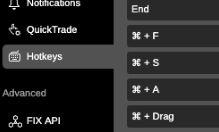
In addition, two new shortcuts have been added to make it even more user-friendly:
Ctrl + F: to switch between watch lists and the searcher
Ctrl + drag: to duplicate an object
cTrader Copy 3.4
The new version includes a selection of cTrader Copy updates, which are designed to make the platform easier to use.
The account details section has been updated to include the date and time of the start of a trade copy. This way, traders can easily know when performance and management fees will be charged.
The "Deposit funds" and "Delete funds" dialog boxes have been modified to include an Add / Remove all funds option. This way, all available funds can now be added or removed with a single click instead of manually inserting a monetary amount.
"Anything worth having is worth going for - all the way." - J.R. Ewing
Offline
Pages: 1
- Index
- » Trading Platforms
- » cTrader Web 3.4 now features 2 new tools: Pencil Tool & Line Study