You are not logged in.
#1 28-12-2022 14:55:49
- johnedward
- Admin & Trader

- From: Paris - France
- Registered: 21-12-2009
- Posts: 3870
- Website
Admirals' mobile trading app: our review
Admirals' mobile trading app: our review

Admirals, also known as Admiral Markets, is one of the most popular brokers among forex traders. Founded in 2002, Admirals is regulated by several leading financial authorities, including the UK's FCA, Cyprus's CySEC and Australia's ASIC. It offers easy access to over 3,850 tradable assets across multiple account types suitable for different types of traders.
Admirals aims to provide favorable trading conditions combined with a safe trading and investing ecosystem. Not only does Admirals offer a wide range of financial instruments, but it also supports several trading platform options, including the popular MT4 and MT5 platforms. On top of that, the broker offers an in-house mobile app to ensure a seamless trading experience wherever you are.
Below, we're going to take a look at the Admirals mobile app and see how it works. Let's take a closer look at the app's features and benefits, supported languages, and other details.
The Admirals mobile trading app
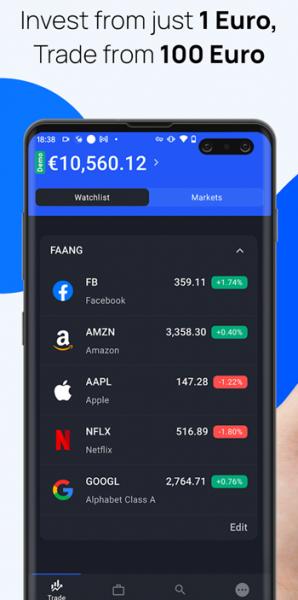
The Admirals mobile app is a secure platform for trading on your mobile phone. It can be downloaded for free on all compatible Android and iOS devices. As of this writing, the app is rated 4.0/5 on Google and has been downloaded by over 99,000 users. On the Apple Store, the app is rated 4.4/5 by 66 users and ranks 97th in the Finance category.
The Admirals mobile app offers instant access to a wide selection of trading products, including CFDs on forex currency pairs, stocks, indices, commodities, cryptocurrencies and ETFs. This app was entirely developed by Admirals, so it is exclusive to their traders. It also means that Admirals could easily improve the application in the future, thus ensuring long-term support and development.
Main features
The Admirals mobile app offers all the basic features needed for trading, along with several additional benefits. Here's a full list to give you an idea.
User-friendly interface
Admirals Mobile App has a very clean and intuitive interface which is perfect for new users. You can easily navigate the app and find what you're looking for with just a few clicks. You can even choose to switch from light mode to dark mode depending on your preference or the available light you are working in.
High level of security
All data included in the app is encrypted. For added security, you can enable biometric security and two-factor authentication like fingerprint or face recognition to enter the app. Additionally, Admirals also uses a specific system to make the app unusable for unregistered users.
Trade with a demo account or a real account
When you log in for the first time after registering your email address or social networks, a demo account is automatically created. Like other demo accounts, it allows you to practice demo trading with virtual money and access most of the platform's features for free. There is no need to make deposits or pay any fees in advance. Once you're comfortable with the app and have learned how to use the available tools, you can easily upgrade to a live account and trade on real markets.
Real-time trading on the world's most popular instruments
The app gives you access to over 2,900 markets, including currency pairs, indices, stocks, metals, and more. You can open as many trades as you want and execute them almost instantly. The best part is that you can do it on the go, as long as you have your mobile phone.
Monitoring of accounts and market prices
Using the Admirals app, you can view a number of charts and graphs, and analyse them in real time from anywhere in the world. There are also other additional features such as margin overviews, built-in contract specifications and customer support channels.
Manage open positions
Apart from opening trades, the app also allows you to easily monitor and manage your open trades. You can manage your risks with the "Protect my trade" feature.
"Anything worth having is worth going for - all the way." - J.R. Ewing
Offline