You are not logged in.
#1 15-11-2025 15:04:56
- johnedward
- Admin & Trader

- From: Paris - France
- Registered: 21-12-2009
- Posts: 3911
- Website
MetaTrader 5: faster and more fluid charts with Blend2
MetaTrader 5: faster and more fluid charts with Blend2

MetaQuotes has just announced that an updated version (build 5430) of the MetaTrader 5 (MT5) platform will be released today.
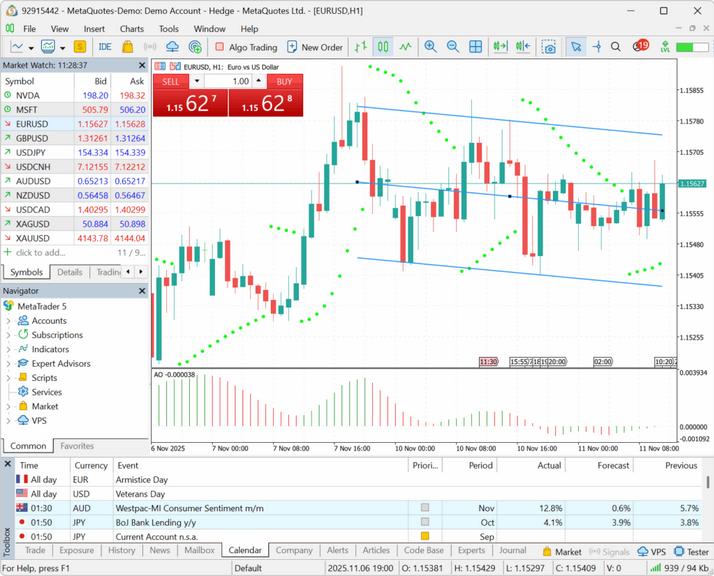
This version introduces a major upgrade to the charting engine. The legacy GDI framework has been replaced by the modern Blend2D engine, which delivers significantly faster and smoother rendering of charts and indicators. Thanks to advanced rendering algorithms and hardware optimisation support, Blend2D provides crisp, detailed charts, precise transparency management, and consistent performance across all systems, including high-resolution displays.
The platform now offers expanded support for the OpenBLAS linear algebra library in MQL5, with approximately 20 new functions added for working with matrices and vectors.
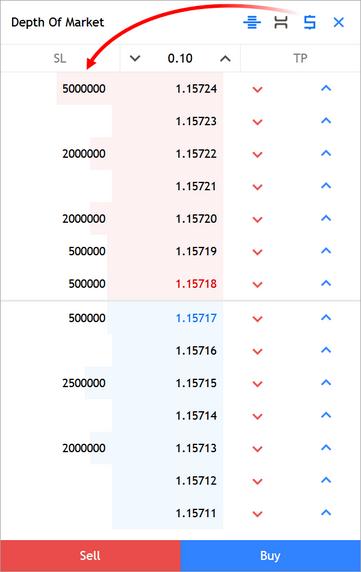
The web version of the platform has also been enhanced, offering increased stability and security. Users can now change the volume display mode directly in the order book.
MetaTrader 5 Client Terminal: Chart engine update. The legacy GDI framework has been replaced by the modern Blend2D engine.
Blend2D utilises a modern rendering architecture and efficiently leverages multi-core processors, ensuring smooth rendering of charts and indicators, even with a large number of objects.
Optimised for modern instruction sets (SSE, AVX), Blend2D significantly accelerates visualization compared to GDI, which does not support these optimisations.
Advanced anti-aliasing and precise color management deliver smooth lines, seamless transitions, and visually crisp charts, which is particularly noticeable when zoomed or using high-resolution displays (HiDPI, 4K).
Blend2D supports alpha compositing and advanced color operations, enabling the use of semi-transparent elements, shadows, and other modern graphical effects.
Blend2D offers consistent rendering across all systems, regardless of the operating system version or video driver configuration.
MetaTrader 5 WebTerminal: Added the ability to change the volume display mode in the order book. Use the button in the top panel to display volumes in lots or units.
The update will be available via the Live Update system.
"Anything worth having is worth going for - all the way." - J.R. Ewing
Offline