You are not logged in.
#1 16-09-2026 16:25:03
- johnedward
- Admin & Trader

- From: Paris - France
- Registered: 21-12-2009
- Posts: 3928
- Website
MetaTrader 5 reinforces its AI assistant with new features
MetaTrader 5 reinforces its AI assistant with new features

MetaTrader 5 (MT5) has received a new update that significantly boosts the capabilities of its AI-powered assistant. Notably, this new version enables the AI to interact more extensively with the trading platform and the Strategy Tester, facilitating the analysis, testing, and optimization of trading robots.
The new version of MetaTrader 5 is being rolled out starting Friday, September 4, 2026.
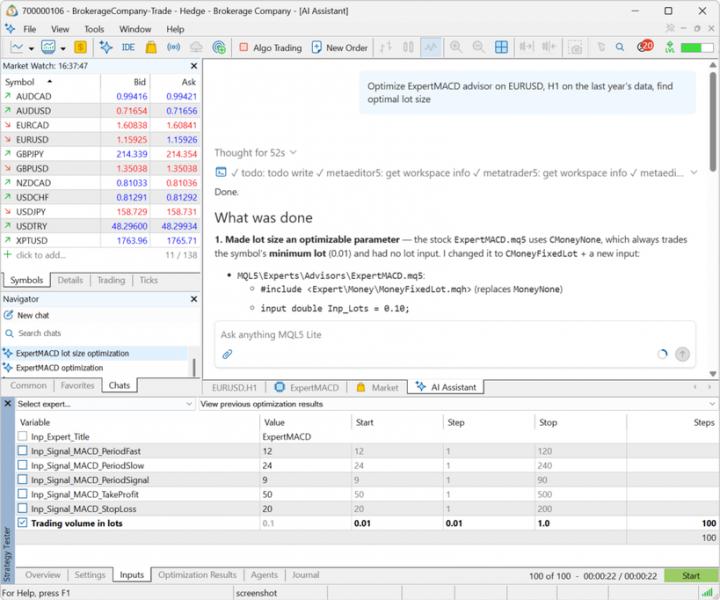
A more powerful AI assistant in MetaTrader 5
One of the key new features involves expanded functionality for the AI Assistant integrated into MetaTrader 5.
The assistant can now retrieve and analyse Strategy Tester reports and logs, check current settings, help launch optimisations, and add technical indicators directly to charts with requested parameters.
It can also review and analyze terminal and Expert Advisor (EA) logs.
These new capabilities allow users to delegate more complex tasks - related to the development, testing, optimisation, and analysis of trading robots - to the AI assistant.
Analysing Strategy Tester results
The AI Assistant can now directly retrieve results from tests and optimisations performed using the Strategy Tester.
For instance, a trader or developer can ask it to evaluate an Expert Advisor's performance, compare results from different optimisation phases, or identify potential issues within a strategy.
The assistant can also review the settings used in the Strategy Tester before a task is executed. Specifically, it can verify the selected Expert Advisor, financial instrument, time period, and other test parameters.
Another important new feature is the AI's ability to analyse Strategy Tester logs to identify errors and help determine their root cause.
AI can add indicators to charts
The assistant also gains greater autonomy in how it operates within the platform. It is now possible to add technical indicators to a chart and configure their settings.
For instance, a user can ask it to add two moving averages - with periods of 20 and 50 - to the currently displayed chart.
This feature simplifies chart setup and allows traders to use natural language commands to perform actions that previously required multiple steps.
Analysis of Expert Advisor logs
The AI Assistant can also access logs generated by the terminal and MQL5 programs.
It can analyse system messages and logs produced by Expert Advisors to identify errors and help developers understand their root causes.
This development is particularly valuable for users who develop or test automated trading robots.
New capabilities for the MQL5 language
The update also introduces several improvements for MQL5 developers.
Notably, MetaTrader 5 expands the functionality available for working with complex matrices and vectors.
New methods simplify the processing, conversion, and validation of complex data used in mathematical and analytical calculations.
New methods include: HasNan and ReplaceNan for complex matrices and vectors; Split, HSplit, VSplit, SwapRows, and SwapCols for complex matrices; Fill, Flat, and Reshape for complex float matrices; Assign and Swap for specific complex matrices and vectors; Free for matrices and various types of vectors.
These improvements offer greater flexibility for developers working on quantitative applications and automated trading systems.
Strategy Tester improvements
The update also fixes an issue regarding the handling of chart events during visual testing.
Previously, using certain keyboard keys during a test could trigger a runtime error; this issue has been resolved in the new version.
MetaTrader 5 Web Terminal improvements
The MetaTrader 5 Web Terminal also benefits from several improvements. Management of Stop Loss and Take Profit levels has been improved, particularly for accounts operating under the netting system.
When a new trade is executed on an instrument for which a position is already open, existing Stop Loss and Take Profit levels are now automatically carried over to the order entry window.
This change prevents previously set protection levels from being accidentally removed during a new trade.
"Anything worth having is worth going for - all the way." - J.R. Ewing
Offline